
Sonos sound system
We chose the Sonos music system for our apartment because it lets every guest play their own music from a smartphone, laptop or tablet. You can also listen to digital radio stations from all over the world. In other words, the ideal system for everyone. And if you have no music on your mobile devices, you can stream to the speakers with your Spotify account, for example.
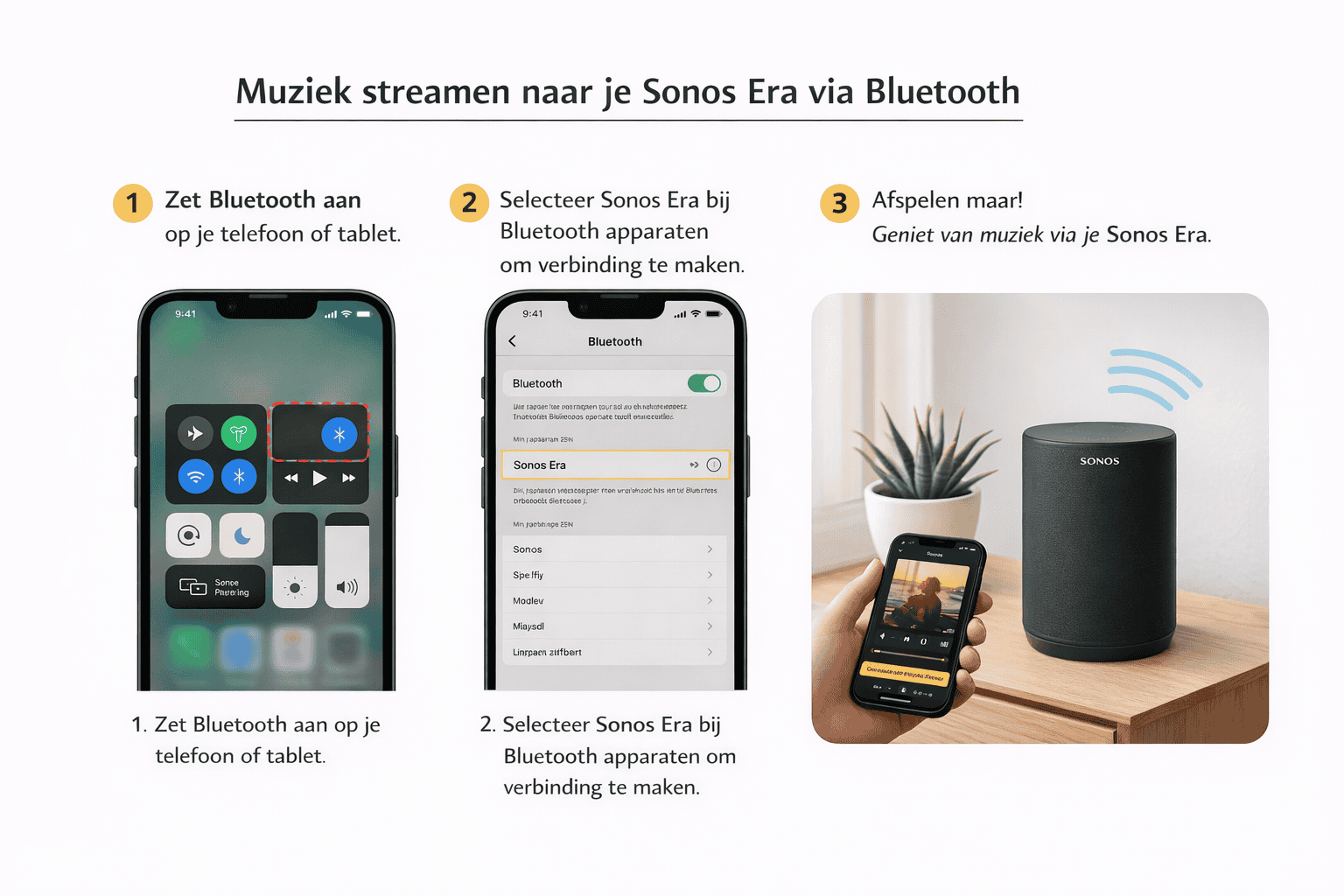
Streaming music to the Sonos Era over Bluetooth
You can easily play music on the Sonos Era over Bluetooth, straight from your phone or tablet. You will find more about Sonos on the official Sonos website.
How it works:
- Switch Bluetooth on on your phone or tablet. What is Bluetooth?
- Press and hold the Bluetooth button on the back of the Sonos Era for a few seconds, until the light flashes blue.
- On your phone, go to Bluetooth devices and select Sonos Era.
- Once connected, you can play music from any app, such as Spotify, YouTube or Apple Music. More streaming tips
The music now plays straight through the Sonos Era.
Tip: the Sonos Era remembers the last device it was connected to and reconnects automatically the next time.
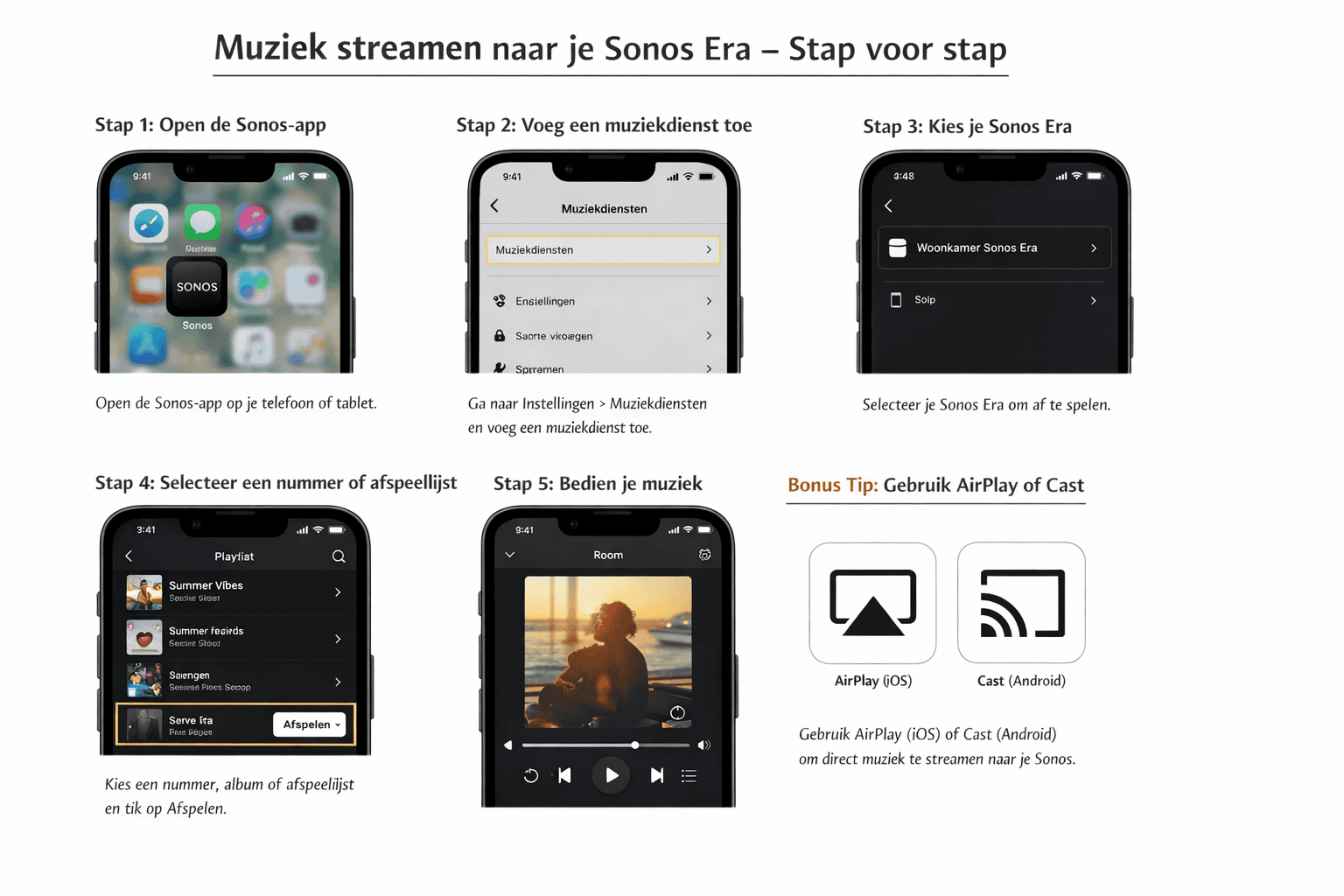
Playing music through the Sonos app
With the Sonos app you can stream music to the Sonos Era over wifi. This is stable and gives the best sound quality. You will find more information on the official Sonos website.
How to use the Sonos app:
- Download the Sonos app
The app is free in the App Store (iOS) and the Google Play Store (Android). - Connect to wifi
Make sure your phone or tablet is on the same wifi network as the Sonos Era. - Open the Sonos app
The Sonos Era is recognised automatically and appears in the app. - Choose a music service
Go to Settings → Music services and add your favourite service, such as Spotify, Apple Music, Deezer or Amazon Music. Sign in with your own account. - Select music
Pick a track, album or playlist and select the Sonos Era as the playback device. - Control your music
In the app you can adjust the volume, skip tracks or pause. You can also play through several Sonos speakers at once (where there are any).
Useful to know
- The Sonos app streams music over wifi, not over Bluetooth. More about Bluetooth
- Your phone acts as a remote control; the music keeps playing even if you close the app.
- For quick playback you can also use AirPlay (iOS) or Bluetooth.
Frequently asked questions
How do I play my own music?
Over Bluetooth or through the Sonos app. For Bluetooth, press and hold the Bluetooth button on the back of the speaker for a few seconds until the light flashes blue; then pick the speaker from the Bluetooth list on your phone. From then on any app plays straight to it, whether that is Spotify, YouTube or Apple Music.
Does it also work over wifi instead of Bluetooth?
Yes, with the Sonos app, and that gives the best sound quality. The app is free in the App Store and the Google Play Store. Make sure your phone is on the same wifi network as the speaker; it then appears in the app automatically. Under Settings and then Music services you add your own service.
Can I listen to the radio too?
Yes, digital radio stations from all over the world.
Does the speaker remember my phone?
Yes. The speaker remembers the last device it was connected to and reconnects automatically the next time.
Can I hear the music on the balcony as well?
If you are sitting on the balcony with the doors open, the sound carries through nicely.